For the developers and people who have interest. I have found a very useful series of FAQs on Mozilla's Developer forum
As soon as we get out of the quarter and it slows down a bit here I should be able to sign my application and get it hosted so we can automate updates which will be very cool.
Thursday, March 13, 2008

Thursday, February 28, 2008
Google Sites
Google Sites is an interesting publicly available collaboration tool that the people over at Google are making available to anyone who wants to use it. To play with it you need to provide your work e-mail address and set up an account It does however remind me quite a bit of MS SharePoint which I have been an administrator for at another institution.
This kind of collaboration tool has a lot of potential and encourage you all to take a look at it.
This kind of collaboration tool has a lot of potential and encourage you all to take a look at it.
Monday, February 18, 2008
Limitations on Search Databases
For the purposes of automating search queries to add them into the search box there are specific limitations that I have run into so far. Vendor's products tend to fall into two specific categories:
In the first instance the search query is built into the URL that is provided for searching (or it can be harvested by checking to see if there is a persistent link to the exact search). If that is the case then we can just extract out the search string that is necessary for the search. For example running a search for "information technology" in the library catalog here at Ohio University:
Here the first part of the search is:
string1 = http://alice.library.ohiou.edu/search/X?SEARCH=
The search string is:
foo = information technology
The last part of the search is:
string2 = &l=&m=&b=&searchscope=7&SORT=D&p=&Da=&Db=
To automate the search you just need to add the pieces together:
query = string1 + foo + string2
Then there is a third variable we tend to need to handle which is authentication. Each library tends to have their own strings for this so the final query actually ends up being:
final = authentication + query
To test at this point you could just copy "final" into a web browser and see if it returned a search. If you get results it works!
Then there is the second type of query and that is the type where there is a persistent session id. At this point I do not have a solution for how to run searches to these databases. There are several databases that I offer to my Engineers which can only be accessed by running queries through Metalib so that is what I offer at the moment.
In the first instance the search query is built into the URL that is provided for searching (or it can be harvested by checking to see if there is a persistent link to the exact search). If that is the case then we can just extract out the search string that is necessary for the search. For example running a search for "information technology" in the library catalog here at Ohio University:
Here the first part of the search is:
string1 = http://alice.library.ohiou.edu/search/X?SEARCH=
The search string is:
foo = information technology
The last part of the search is:
string2 = &l=&m=&b=&searchscope=7&SORT=D&p=&Da=&Db=
To automate the search you just need to add the pieces together:
query = string1 + foo + string2
Then there is a third variable we tend to need to handle which is authentication. Each library tends to have their own strings for this so the final query actually ends up being:
final = authentication + query
To test at this point you could just copy "final" into a web browser and see if it returned a search. If you get results it works!
Then there is the second type of query and that is the type where there is a persistent session id. At this point I do not have a solution for how to run searches to these databases. There are several databases that I offer to my Engineers which can only be accessed by running queries through Metalib so that is what I offer at the moment.
Wednesday, February 13, 2008
Good News - Engineering Toolbar Rollout Update
So far I have taught instruction sessions on how to utilize the Engineering Toolbar for research to the following sections:
Electrical Engineering/Computer Science Graduate Students
Electrical Engineering/Computer Science Faculty
The Technical Writing section for the Russ College of Engineering (a mixture of graduate students from all over the college).
The toolbar has been well received. I have received mail back from the Chair of EE/CS suggesting that all faculty in that department should go ahead and read the handouts I provided as well as install the toolbar to speed their research and better results. I have also had walk-ins from graduate students who wanted individual instruction involving the toolbar (and had not attended my previous classes).
My next instruction session is tomorrow with the Mechanical Engineering Graduate students.
One of the Chairs has suggested that I go ahead and contact the main networking person for the College and get the toolbar installed on all the machines there. This is good news but I need to finish up a final plagiarism component for the toolbar before making such a widespread release.
Electrical Engineering/Computer Science Graduate Students
Electrical Engineering/Computer Science Faculty
The Technical Writing section for the Russ College of Engineering (a mixture of graduate students from all over the college).
The toolbar has been well received. I have received mail back from the Chair of EE/CS suggesting that all faculty in that department should go ahead and read the handouts I provided as well as install the toolbar to speed their research and better results. I have also had walk-ins from graduate students who wanted individual instruction involving the toolbar (and had not attended my previous classes).
My next instruction session is tomorrow with the Mechanical Engineering Graduate students.
One of the Chairs has suggested that I go ahead and contact the main networking person for the College and get the toolbar installed on all the machines there. This is good news but I need to finish up a final plagiarism component for the toolbar before making such a widespread release.
New Additions and Functionality

Resizing Gripper
With the help of The University of Pennsylvania Libraries Toolbar I was able to correct and add a resizing gripper to the toolbar. The gripper behavior is a bit non-intuitive as to how it works but I was able to correct the behavior by locking down each component by setting their flex values. The gripper resizes the box to the immediate left of it and nothing else. If the values were not set then resizing the toolbar would be destructive and when you pulled the bar to the left and let go of the element it would leave everything scrunched together (like my previous post).
So each XUL element needs to have locked size settings and a setting for flex:
width="value"
minwidth="value"
flex = "0" (or 1) (0 means that it is not flexible, 1 means you can resize it).
Tabbing Controls

One of my faculty asked me to standardize the searching method that is built into the toolbar to load each new search into a pop-up menu. I have added the option to pick whether or not the user wants to load searches in new windows or to load them in the current window they are working in. The following XUL script will add in a tabbing section to a menu. The function that follows controls whether or not tabbing is used.
XML:
<menupopup id="EToolbar Settings">
<menuitem label="Tabbing On" oncommand="engrTabSet(true)" tooltiptext="Turn Tabbing On" />
<menuitem label="Tabbing Off" oncommand="engrTabSet(false)" tooliptext="Turn Tabbing Off" />
</menupopup>
Javascript Functions:
//engrTabSet(Boolean) - Sets whether tabbing is on or off.
function engrTabSet(engrtabval)
{
if(engrtabval)
{
engrpops=true;
}
else
{
engrpops=false;
}
}
//engrTab(String) takes the string that is given to it and either loads it into a new tab (if tabbing is on) or loads it into the same window otherwise.
function engrTab(engrlink)
{
if(engrpops)
{
var newTab=getBrowser().addTab(engrlink);
getBrowser().selectedTab=newTab;
newTab.selected='true';
}
else
{
window._content.document.location=engrlink;
}
};
I have gone through the code that I used for the toolbar and cleaned up syntax and formatting. I also standardized several of the functions so there would be no conflicts with other applications.
Thursday, January 31, 2008
Bug Scrunches Toolbar! Compatibility ...
First a note about compatibility; I have a friend who tried to run the Engineering Toolbar in the beta version of Firefox and they were unable to do so. I'll have to look into why this is the case. Now for the fun part:
What happened to my toolbar??!?
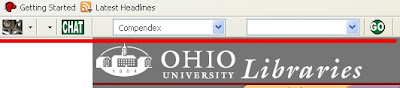
I initially ran into this problem the first time when I was working on getting a resizing gripper to change the size of the toolbar.
Then I also had a student report this error which was even worse than the first one!

The sequence to recreate the problem that I first found is to do the following:
Click View -> Toolbars -> Customize
Then click "Restore Default Set"
I mention this so you will know that there is a bug in Firefox that has yet to be fixed and what specific actions create the bug. You do not need to repeat the steps but if you do I have instructions on how to fix it.
So how do we fix this? A word of warning this process is destructive if you have customized your toolbar. As such you may want to take a screenshot of the changes that you have made so you can re-implement your changes.
Here is how you fix the error:
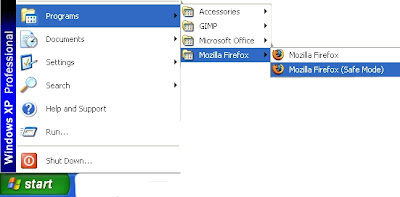
1. Exit out of Firefox.
2. Click on the start menu
3. Select Mozilla Firefox (Safe Mode)
4. Click on the option box for "Reset Toolbars and Controls".
5. Click "Make Changes and Restart".
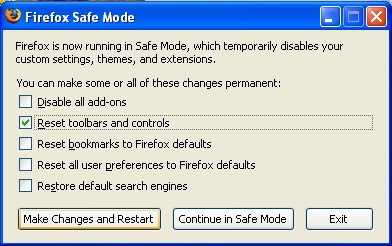
That should fix the problem. :)
-------------------------------------------------------------------------------------
Special Instructions for Macintosh Users:
In order to open Firefox in Safe Mode, go to the Utilities menu and launch Terminal. Then type the following command at the Terminal prompt:
/Applications/Firefox.app/Contents/MacOS/firefox -safe-mode
Then, a new Safe Mode window will pop up; follow instructions as for Windows (above).
What happened to my toolbar??!?

I initially ran into this problem the first time when I was working on getting a resizing gripper to change the size of the toolbar.
Then I also had a student report this error which was even worse than the first one!

The sequence to recreate the problem that I first found is to do the following:
Click View -> Toolbars -> Customize
Then click "Restore Default Set"
I mention this so you will know that there is a bug in Firefox that has yet to be fixed and what specific actions create the bug. You do not need to repeat the steps but if you do I have instructions on how to fix it.
So how do we fix this? A word of warning this process is destructive if you have customized your toolbar. As such you may want to take a screenshot of the changes that you have made so you can re-implement your changes.
Here is how you fix the error:
1. Exit out of Firefox.
2. Click on the start menu
3. Select Mozilla Firefox (Safe Mode)

4. Click on the option box for "Reset Toolbars and Controls".
5. Click "Make Changes and Restart".

That should fix the problem. :)
-------------------------------------------------------------------------------------
Special Instructions for Macintosh Users:
In order to open Firefox in Safe Mode, go to the Utilities menu and launch Terminal. Then type the following command at the Terminal prompt:
/Applications/Firefox.app/Contents/MacOS/firefox -safe-mode
Then, a new Safe Mode window will pop up; follow instructions as for Windows (above).
Wednesday, January 16, 2008
OU Engineering Toolbar - Release
Today is the soft roll-out for the OU Engineering Toolbar. If you want to play with the toolbar you can download it from the ENGR Wiki where it lives. You will also find instructions about how to install/uninstall the toolbar there.
I will be showing this to a class of 20 graduate students in Engineering my first real crop of beta testers.
I will be showing this to a class of 20 graduate students in Engineering my first real crop of beta testers.
Subscribe to:
Posts (Atom)
